Saturday, 19 May 2012

iNever gave up!

Undaunted by my setbacks to date - I ordered another replacement iPhone screen and digitizer, and to cut a seemingly endless story short, I fiited it no problem - got the screws in the right place and voila;


I had a few further snags in that I found that the WI-FI wouldn't work.  I investigated what could be wrong and discovered that I had rather carelessly detached a clip from the motherboard that is important to the WI-FI functionality.  It's not an uncommon problem and I restored the WI-FI by inserting a small piece of copper wire underneath a screw where the clip should have been.  Unbelievably, the WI-FI works perfectly once more.


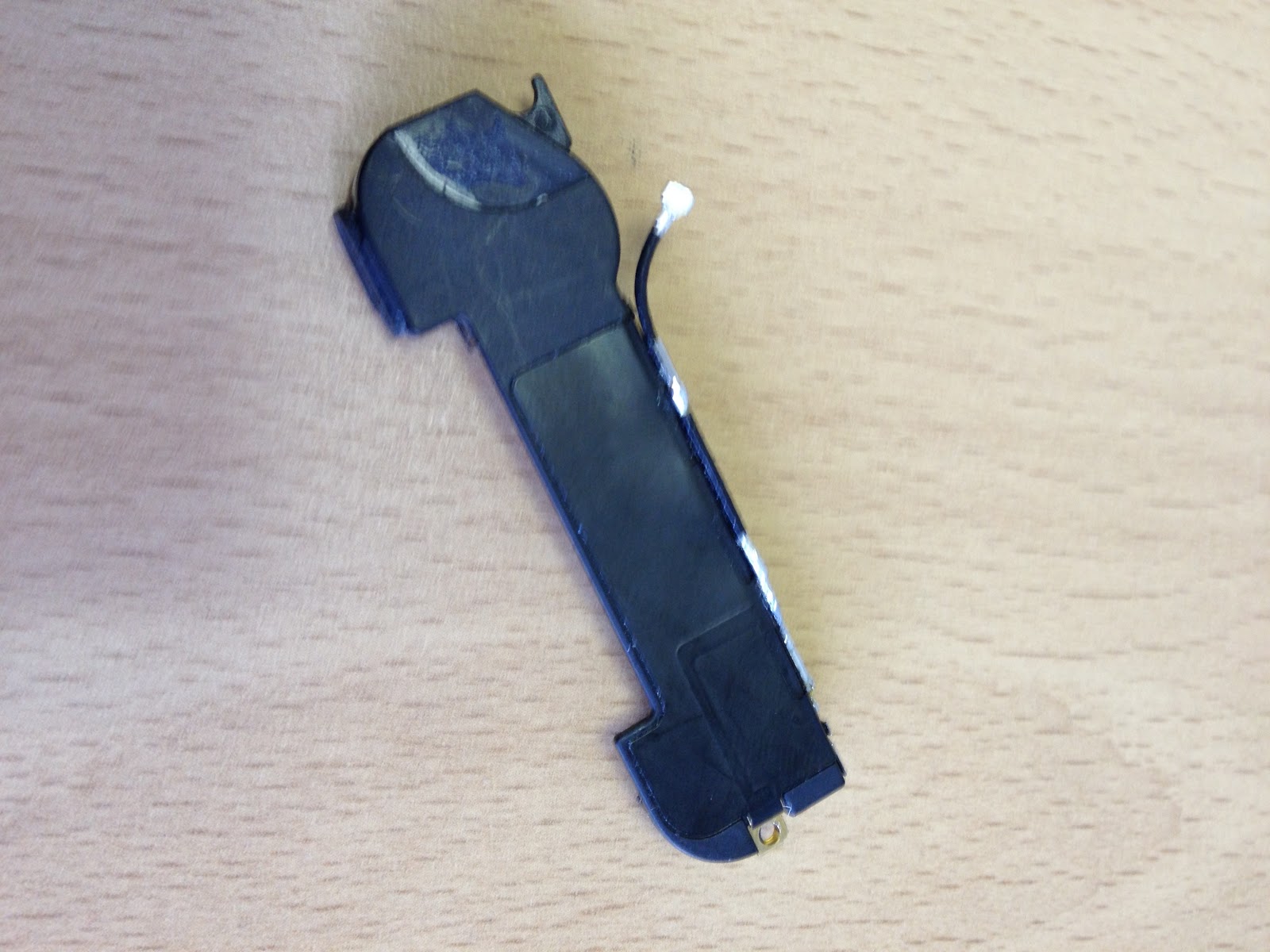
I also ended up having to replace the antenna/speaker component that you can see in the above picture, as the connector that you can see which connects to the motherboard got damaged on the original.


So, I nearly have a fully functional iPhone 4.  The final issue I have is that the mobile signal drops whenever I pick the iPhone up - which is obviously a bit of a nuisance.  But, my research informs me that this could be a loose connection, or the fact that some of the connections need cleaning with a de-greaser such as Windex.  As yet, I have not had the time to try this but it is on my to do list.

So what have I learned?  The most important thing is that I should have taken my time more, and been a bit more careful.  I was in truth a bit gung-ho, heavy handed, and in too much of a hurry.  I made several mistakes as a result but I now know that I can fix an iPhone that ends up in such an unfortunate condition.

I have in fact successfully replaced the screen on a white iPhone 4S for a colleague - and I'm pleased to say that this repair was a complete success.

And so ends this story.  I will post an update as to whether I get the SIM working properly, but in the meantime - I hope you have enjoyed reading about the ups and downs of this epic journey!

And that's that!
Peter

Oracle Virtualbox

I have often found myself wanting to try out new and different operating systems, yet frustratingly I have no spare hardware on which to experiment.  That's why I was really pleased to discover Oracle Virtualbox.

As described on their own website (https://www.virtualbox.org) - "Virtualbox is a powerful x86 and AMD64/Intel64 virtualization product for enterprise as well as home use. Not only is VirtualBox an extremely feature rich, high performance product for enterprise customers, it is also the only professional solution that is freely available as Open Source Software under the terms of the GNU General Public License (GPL) version 2".

It's easy to download and setup, and if like me you have a laptop with a 500gb hard drive - it gives you the chance to test multiple platforms on the same laptop, without the inconvenience of overwriting your existing OS, or setting up messy dual boot configurations.

Here's what Virtualbox looks like when you start it up;


As you can see, I have already used Virtualbox to install and test multiple platforms - including Windows 8 Consumer Preview, Ubuntu (more to come on that in another post), Mac OS X Snow Leopard, and even Android Ice Cream Sandwich.  I have also been able to find an ISO image of Windows 3.1 (purely for nostalgia purposes).


Configuring specific settings for each platform can be a bit tweaky, but there is lots of advice available if you do a bit of Googling - and so far I have managed to get everything working that I have put my mind to.


So if like me, you come from Planet Geek, and you want to try out different platforms to see what they can do - give Virtualbox a try.


And that's Virtualbox.  Share and Enjoy!
Peter


Wednesday, 16 May 2012

Screwed!

So my iPhone 4 replacement screen and digitizer had arrived and I took everything I needed home one Monday night, and once the boys were asleep and Louise was out to teach her Slimming World class - I got to work.  This is what the replacement screen and digitizer look like next to the gutted iPhone case;


Things started pretty well.  I listened to the football as I worked - Newcastle were away to Arsenal that night, and they scored early which was great, but Arsenal quickly equalized.


Bit by bit, I put the iPhone back together.  Getting some of the very small screws back into place was a lot harder than taking them out.  I made a few small mistakes along the way and had to backtrack - but eventually I got the phone back together and the moment of truth arrived, would the phone actually work?


I powered it on, and incredibly I see the Apple Logo and the phone begins to start up.  After a moment I see the familiar Home Screen and I feel utterly elated.  I can't believe that I have actually done this!!


However, I notice that there is a small gap between new screen and the case - so I figure I haven't screwed something in far enough.  I take off the back cover again, and I can see that one of the clips securing the motherboard doesn't seem to be quite secured enough. It is at this point that I make what can only be described as a "questionable decision".  I take my thumb and I push down on the connector.


I put the back cover back on, restart the phone - and this what I see;


My heart literally sinks.  What have I done?  I take the phone apart again, and it quickly becomes clear that I have one of the screws in the wrong place, and the action of pressing down on that clip with my thumb has pushed that screw through the new screen and absolutely ruined it!!


From a sense of utter elation, I now feel like I have been absolutely stabbed in the heart!  


Just when I think things can't possibly get any worse - Arsenal score a 95th minute winner!!


And that's how you ruin a new iPhone screen and digitizer!
Peter

Friday, 11 May 2012

Windows 8 is coming!

For the past few years - Microsoft haven't really done anything special.  Apple on the other hand have moved from the obscure into the mainstream.  iPhone and iPad are the 2 stand out Apple products for me.  These devices have propelled Apple to another level and Microsoft didn't seem to be responding.

To be fair, Apple are really focusing on the consumer - whereas business is really Microsofts bread and butter.  However, the tablet market has had a severe impact on consumer PC sales and Microsoft have to be increasingly aware of this.

So it's no surprise that a few months ago, Microsoft released Windows 8 Consumer preview (the beta version of their next Operating System).  I downloaded the preview and installed it on a PC and I must say that I have been on the whole very impressed.


In its current form, this OS is a bit of a hybrid.  They have designed it with tablets very much in mind - but it works equally well on a traditional PC with a keyboard and mouse.  Microsoft say that Windows 8 really comes to life on a tablet - but sadly, I currently have no suitable tablet hardware available to me to test this out, so for the time being I am stuck using it on a PC.

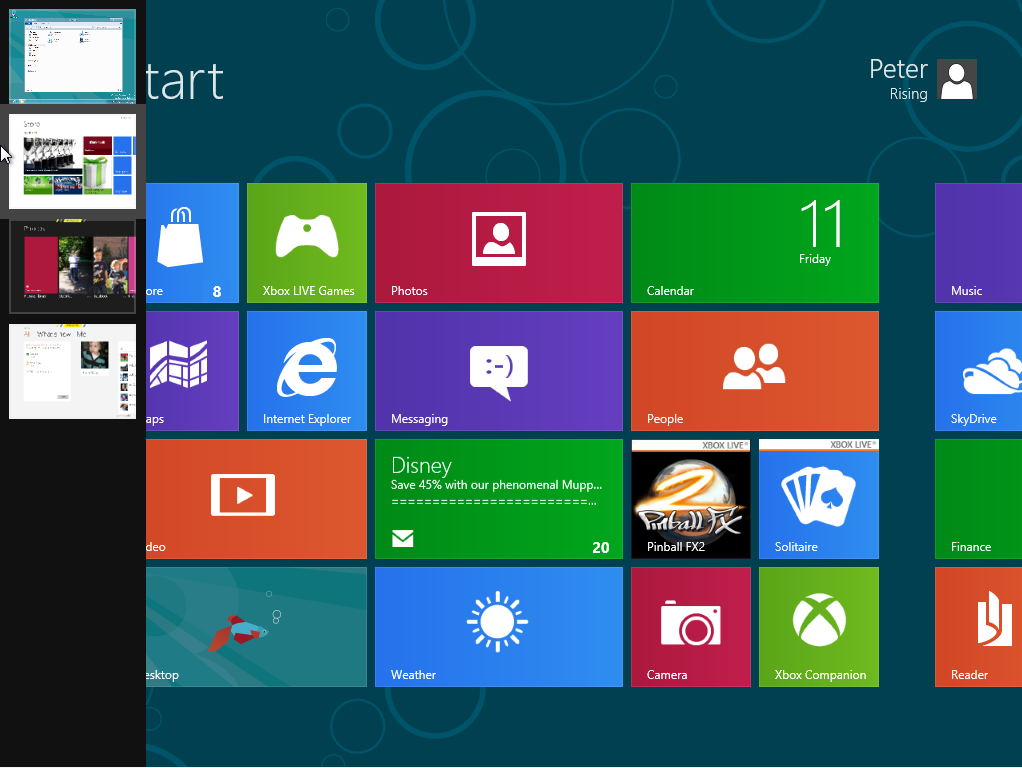
When you start up Windows 8, this is what you see;


The Start Screen contains tiles for what Microsoft are calling "Metro Style Apps".  You can immediately see that this is a touchscreen environment, and the style is pretty much identical to the Windows Phone OS that you will find on many HTC devices and the Nokia Lumia.  

So this is an early indication of Microsofts intention to standardize their entire range of products, in the same way that Apple has done with iOS.  Microsoft are clearly going to encourage you to have a Windows Phone, and a Windows 8 Tablet or PC/Laptop.  The benefits of this are that all your content will be highly available to you on all your devices and in a familiar way that is easy to access.


Apps

Windows 8 has some really nice native Apps such as the People Hub (which again is already available on Windows Phone).  In essense, this is an address book, but it's so much more than that.  It pulls together all of your contacts, and social feeds into one place giving you instant access to the information you need to keep you in touch.  

Then you have the Photos App.  Here you can quickly access all of the photos that you have on your device, or from your Facebook Account, your Skydrive, and from Flickr.  I like this one very much as it gives you quick and easy access to all of your pictures from all of your devices and social media in one convenient and easy to use Application, and I can only see it getting better in the final release of Windows 8.


In addition these native Apps, you can find many more that you can download from Microsofts new App Store.  Now this obviously has a long way to go until it catches up with Apples App Store and Android Marketplace - but it will get there.  There are already a few really good Apps available in here.  Popular games like Cut the Rope, News apps such as The Daily Telegraph, and when you download an app - it simply appears on your Start Screen as a Metro Tile.


Where is the Start Button though?

You will notice on the Start Screen that there is a tile called Desktop.  When you click this, it takes you into a more familiar Windows 7 style environment - and this will appeal greatly to those who like Windows 7 and aren't big on change.


However, one big change is the absence of the Start Button.  This has caused great waves already in the "tech community" and some developers have even found ways to "hack" the start button back onto the OS.  Whether it is present on the final release of Windows 8 remains to be seen - but for the time being, if you hover your mouse over where the Start button used to be, the Start Screen reappears and enables you to go back to the Metro Style Environment.

Charms

If you move you mouse the the right of the screen, the charms menu appears, giving you access to settings, devices and search features amongst other things.  In tablet format - the charms menu will be accessible via a touchscreen "gesture"


Whats Open

If you move your mouse to the top left of the screen, it shows you what apps you have running in the background and you can go back to them simply by selecting the one you need,


 Overall Thoughts

First impressions of Windows 8 are that it shows much promise.  I like the way it looks and feels like Windows Phone and I think this will help Microsoft to sell it's entire range of products.

I like the Start Screen and the Metro Style Apps.  I'd really like to see it on a tablet though, and it will be interesting to see what the final version is like once it's properly released.

As for that release date - well November this year has been rumoured, but for now, we'll just have to wait and see.  Whenever it is though - I predict Microsoft will be back with a bang!

And that's Windows 8!
Peter

Friday, 4 May 2012

The Next Galaxy - Samsung Galaxy S3 arrives

When it comes to smartphones, I'm an Apple Guy - I think most people know that by now.  Admittedly, things can change though.  A little over 2 years ago I was Blackberry through and through and considered Apple to be the Devil!  That just seems silly now, but it proves that you should never say never.


This brings me to the latest smartphone launch by Tech Giant Samsung just yesterday.  The Samsung Galaxy S3 comes hot on the heels of its hugely popular and successful predecessor, The Samsung Galaxy S2.


Available in marble and pebble blue, it has a 4.8-inch HD Super AMOLED screen which is substantially bigger than the S2's 4.3-inch display.  Further technical specs appear below - but first and foremost, lets see some pics of the phone (courtesy of the Samsung website).


This is a nice looking phone without a doubt.  The screen size is not for me - I think it's too big for a Smart Phone but that's just a personal preference.  The sales of the S3s predecessor don't lie.  Clearly, a lot of people want a smartphone this size.  Here it is in the marble;

The case is made of plastic, as compared to the iPhone 4S' glass case.  This apparently makes the S3 feel lighter than the iPhone, but many reviews of the S3 that I have read so far comment that this also makes the device feel a little cheaper.  Here it is in pebble blue;


Specs

  • 136.6 x 70.6 x 8.6mm
  • 133 grams
  • Display: 4.8-inch HD Super AMOLED (1280×720) Pentile (no Plus)
  • Processor: Exynos 4 Quad @ 1.4Ghz for HSPA version
  • 1GB of RAM
  • Rear Camera: 8MP Autofocus, Flash, Zero Lag Shutter BSI Image sensor
  • Front Camera: 1.9 MP HD, Flash, Zero Lag Shutter
  • Video: Full HD 1080p Recording and Playback
  • Storage: 16GB/32GB/64GB
  • 2,100mAh battery
  • GPS with GLONASS
  • 802.11n Wi-Fi, NFC, Bluetooth 4
  • microSD expansion
  • 21Mbps HSPA, LTE supported
  • Micro SIM
  • OS - Android Ice Cream Sandwich

Thoughts

It's going to take something pretty special to eventually surgically detach me from my iPhone, and for me - this is not it.  Although I quite like the look of the handset, I just don't like Android - and that is my biggest problem.  Androids interfaces feel a bit dull to me and don't compare to the beauty and simplicity of iOS.  

If I were to move away from iOS devices right now - then it would unquestionably be to the impressive and and ever improving Windows Phone platform, and probably to the beautiful Nokia Lumia 800 or 900 series.  More on the Nokia and Windows Phone to come in another post, but in the meantime - in the seemingly never ending battle between Samsung/Google & Apple, it will be interesting to see how Apple respond to this. 

I have a feeling we will find out this October when I am predicting the arrival of "The New iPhone", but we will just have to wait and see.  If you want to get your hands on the Samsung Galaxy S3 though, you won't have as long to wait, as it will be released in the UK at the end of May.

In Depth Reviews

Check out far more eloquent, and possibly unbiased views on the new Samsung Galaxy S3 at the excellent T3.com and Techradar.com


Hope you've found this entertaining and informative.  
Peter


Thursday, 3 May 2012

CloudOn for iPad

After yesterdays post on Online Cloud Storage, a friend informed me about a startling omission in my knowledge on this subject.  I must confess that I had not yet heard about CloudOn for iPad, so I quickly brought myself up to speed, and quite frankly - what an amazing application.


CloudOn was launched in January and in a nutshell, it brings Microsoft Office to your iPad.  It allows you to create, and edit Word, Excel, and Powerpoint files on the iPad, and the user experience is absolutely tremendous.  This isn't a piece of software that is trying to copy what Microsoft Office does - it is actually Microsoft Office.  How they have managed to get away with this in a free iOS app and not suffer the wrath of Microsoft is anyones guess, but this is a very very nice app indeed.


It doesn't stop there though.  This app was launched with integration to Dropbox, so you can easily save your Word document, Excel Spreadsheet, or Powerpoint presentation to your dropbox once you have finished working on it in CloudOn, and you can pick it up on any of your other devices where you can access Dropbox.


In addition to this, the App was just updated to include integration with Box, and the latest entry to the Cloud Storage Market - Google Drive.  This is absolutely amazing.


These new additions to the App really open up the possibilities.  When you add up the free storage available from the 3 integrated Cloud technologies - this basically is giving you the ability to have up to 12gb of cloud storage accessible to you on your iPad - all in the same App.  


I for one am impressed.  Imagine how much more convenient this can make things for you.  For example, you need to email a document which is on your laptop at short notice - but your laptop is in your bag and not powered on.  It's a real hassle.


If however, the document is on your Dropbox, Google Drive, or Box - then it is instantly accessible to you via CloudOn on your iPad.  You can quickly email it to someone, or you can make changes to the document, knowing that those changes will be instantly synchronized and available to you on your laptop the next time you boot it up.


And that's CloudOn!  Try it out.  I think you'll be impressed.


Peter


Wednesday, 2 May 2012

Outlook is Cloudy


Online storage seems to be "The New Black".  If you are running out of disk space on your PC or laptop, then you now have a wide range of choices to store and easily access your data "in the cloud". Here's a quick rundown of what's out there right now and how they stack up against each other.


Google Drive


Google are the latest big name to enter into the cloud storage market, with Google Drive launching just last week.  Drive is strongly integrated with the existing Google Docs service and when you sign up you will get 5GB of free storage straight away.


It's still early days for Google Drive but it looks pretty good and I'm sure it will integrate well into Googles existing suite of products as they continue to battle with Apple for supremacy.


Platforms
Web 
Windows Application
Mac Application
Android App
iOS App is in the works


Storage Plans
5GB:Free 
25GB: $2.49(£1.54)/month 
100GB: $4.99/month 
1000GB: $49.99/per month


Dropbox


Dropbox has gained more than 50 million users since being founded in 2007, and it could be argued that they are the real pioneers when it comes to this sort of technology.  Many of the big names are taking their lead from Dropbox's impressive impact.  In fact, they have been so impressive that it's a surprise to me that one of the tech giants hasn't tried to acquire them as yet. 


Dropbox's desktop programs allow users to easily drag files into a folder rather than the far more time consuming method of uploading them. This sort of innovation has set the standard for emerging competitive cloud storage technology, and they were also at the forefront of developing apps for the major mobile operating systems.


Platforms
Web 
Windows Application
Mac Application
Android App
iOS App
Blackberry App


Storage Plans
2GB:Free (extra storage for referring others)
50GB: $9.99(£6.20)/month or $99/year 
100GB: $19.99/month or $199/year 
Unlimited: $795/year for five users and $125/year per additional user


MicrosoftSkyDrive


Like Dropbox, Microsoft's Skydrive has been around for quite some time.  Initially know as Windows Live Folders, Skydrive has had a slight restructure in recent weeks in terms of their storage options.  This brings them more into line with their competitors but they are still the cheapest when it comes to "paid for" storage

The major change is that all users were previously granted a very generous 25GB of free storage.  They have now dropped that down to 7GB.  However, if you were a Skydrive user prior to April 22nd 2012, then you get to keep your 25GB which is nice.

This is the platform that I have used the most so far, and I have found it a tremendous way to get the vast folders full of photographs off my laptop and into the cloud, and they remain easily accessible on my laptop, iPhone and iPad.  

One of the other great features of Skydrive is easy editing of Microsoft Office files.


Platforms
Web 
Windows Application
Mac Application
iOS App
Windows Phone
Windows 8 Consumer Preview


Storage Plans
7GB:Free 
27GB: £6/year 
57GB: £16/year 
107GB: £32/year

Box

Box is slightly different in that it seems to be directly aimed at the Enterprise Sector.  Founded in 2005, it was one of the very first cloud-storage services.

Providing a wide range of applications for desktop operating systems and browsers, in their own words "Box provides everything you need to collaborate on content online".

Box is the only technology in this list that I have not personally used - so I cannot really comment on it with any experience.  I do intend to familiarize myself with the product and may post a separate review on this Blog at a later date.

Platforms
Web 
Windows Application
Mac Application
iOS App
Android App
Blackberry App


Storage Plans
5GB:Free 
25GB: $9.99(£6.20)/month 
50GB: $19.99/month 
1000GB: $15 per user/month (minimum three users) 
Unlimited: prices vary


Apple iCloud


iCloud keeps photos, apps and music synced across separate devices. For example, a book purchased on the iPad will be open on the same page when it is opened on the iPhone. 


Apple also offers its iTunes Match service, which lets you backup any song in your iTunes library - not just those bought on the iTunes store - and download them onto other devices. 


iCloud is designed only for Apple's ecosystem, and is not as flexible as other online storage services. Only certain types of files can be stored.


Platforms
Windows
Mac
iOS


Storage Plans
5GB:Free 
15GB: £14/year 
25GB: £28/year 
55GB: £70/year 
iTunes Match: £21.99/year


Conclusions


Cloud technology is here to stay,  It's very early days but its only going to improve over time and there are going to be a lot more options to choose from I would guess.


For the here and now, the ones that I use on a daily basis are iCloud and Skydrive.  I like them both for what they can provide for me.


With iCloud, I love that I can take a picture on my iPhone, and it appears on my iPad and also on my laptop and Apple TV.  I also love that I can backup my iPhone and iPad to iCloud and that I am no longer tethered to iTunes.  I am not so much of a music person, but I can see that iTunes match would  be very appealing to people who are.


Skydrive has given me the ability to easily move my photos from my laptop to my Skydrive folders, and their iOS apps for iPhone and iPad allow me to access my photos pretty much anywhere.  I am also very pleased that I was a Skydrive user before they took the free storage down to 7gb, I get to keep my 25GB (for the time being at least).  In addition to this, Windows 8 is just around the corner.  This, along with the ever improving Windows Phone platform means that Microsoft are going to be back with a bang in my opinion.  


More to come on Microsoft and WIndows 8 by the way in another post, but in the meantime - don't let hesitation "cloud" your judgement!


Peter