Monday, 28 May 2012

Standing in the way of progress

As many of you will know, it doesn't take much for me to get on my soapbox and complain about things that bug me in day to day life. The name of this blog is a bit of a giveaway to that fact really.

One thing that I am finding increasingly frustrating - is a combination of the slow progress we are making in certain areas, combined with an astonishing reluctance to let go of some genuinely pointless and outdated technology. I feel a list coming on;

1) Fax Machines


It's the year 2012 for heavens sake. Why are people still using fax machines? This is a technology that seemingly just refuses to die. There are so many alternatives now too. Email, FTP Servers, Text Message, iMessage, all manner of Live Chat. So why won't people just let go of their fax machines? I just don't get it. They are old, unreliable - cartridges cost money, and every alternative is just so much cheaper and easier. So why won't fax machines just go away and politely expire??

2) Cheques


Why we still need cheques is beyond me. I can't imagine anyone could argue otherwise. In this day and age, the cheque has become truly pointless. We have credit/debit cards, Online Banking, even Apps for Smartphones such as the excellent Barclays Ping-it. I can never find my cheque book, and if receive I a cheque - I then have the inconvenience of having to go to the damn Bank on my lunch break when I should be in the canteen eating my supernoodles and mackerel.

3) Cash


OK, maybe I'm ahead of my time on this one, and I think 10 years from now we will genuinely be very near to living in a cashless society. That being said, in the here and now - I find cash to be an absolute nuisance, and like our Queen - as a rule I don't carry it.

Yesterday I was in a hospital car park, and I happened to know that the parking machine takes credit/debit cards - so I don't have to worry about taking cash. However, even though the machine accepts my pin, it decides to refuse my transaction. So I am left fumbling in my wallet trying to find £2.50 whilst an irate group of people wait behind me at the single machine. In what can only be described as sheer miracle, I actually manage to scrape together £2.50 (I may then have said out loud "dumbass machine, and stormed off). The point being though - I should not have had to have cash in this situation.

There are early signs of progress in this area. For example, you can now order takeaway food online at just-eat.co.uk and pay with your card, and you don't have to pick up the phone and talk to some fool who is going to get your order wrong. Your food is then delivered and you don't have the problem of having the grumpy delivery bloke whine and complain when you give him a £20 note (because you've already paid in advance). Seriously though, these delivery blokes annoy me beyond belief. It's absolutely not my responsibility to have change for him just to make his life easy is it!!!

I could go on about cash all day actually? Why for example in 2012 don't snack machines let you pay by card - or at the very least, why don't they take coppers (the only cash I ever seem to have in abundance).

Cash is just not my friend. I never have any on me when there is some sort of collection at work for the new baby of the wife of someone on the shop floor that I have said hello to twice in 14 years! I swear, cash is just a pain. The sooner you can scan your thumb on a little pad of some sort to pay for anything at any time - the happier I'll be!

4) Broadband Speeds/4G/LTE


Given that there is so much you can now download, and stream over the internet these days - we in the UK are embarrassingly behind other countries when it comes to broadband connections and mobile capabilities. I sometimes feel as if we are still using 56k modems when I have to wait for a YouTube video to buffer. There should be no damn buffering! Buffering should be a thing of the past. The most irritating thing about this is that all the big Communications companies seem to do is argue about it instead of working together to get these technologies up and running better for everyone. I don't care about the politics of it or which network brings it first. Just get it done for heavens sake!!!


Anyway, if I put my mind to it, this list could go on forever so I'll quit right here for now. Hopefully the above listed will not continue to ruin my life for too much longer!

Peter

Tuesday, 22 May 2012

Where it all began

The year was 1993. I was working for a Law Firm on Hood Street in Newcastle upon Tyne, initially as one of an army of Office Juniors who's tasks ranged from photocopying, shredding, delivering letters, assembling Ikea flat pack furniture, and my personal favourite - cleaning the front step following a visit by persons worse for wear the night before!

Overall, it was a very unhappy time. I wasn't very good at even these very basic tasks - after all they weren't very uplifting or motivating, and most of my days were spent getting bossed around by people on a major power trip. No, it wasn't the Partners, it was the Legal Secretaries and Articled Clerks! Some of the grief I got caused much cursing, eye rolling, and sighing at the time, but to be fair in those days I had a large sense of misplaced entitlement mixed with an overall lazy and uncooperative streak (haven't changed much have I)! So I probably deserved it I guess.

Anyhow, it was around this time that I got my very first Home PC. I had never had a computer of any sort before so I wouldn't have even known how to switch one on. A friend of my Dads was quite computer literate and helped us get started. He recommended a good place to buy a PC and we took his advice. Shortly afterwards a shiny new IBM Compatible 486 DX/66 was connected up in my bedroom at my parents house on my similarly new computer desk. Being 1993, this thing was big and white! It had 4mb of memory, and a 130mb hard disk. Not only did it have a 3.5 inch floppy drive, it also had a 5.25 inch one as well! Although I don't have a picture of it, it looked very much like this one;


The pre-installed Operating System was MS-DOS 6.22 with Windows 3.1. When you powered on the machine, this is what you saw;


From the DOS prompt, you had to change to the Windows directory by typing cd windows. Then, you typed win to start up Windows 3.1. Here's what it looked like;


To those of you who were born in the 90s (and now bizarrely are grown ups), yes folks - this is what Windows used to look like. And it was absolutely great. To quote Kid Rock, "We didn't have no internet", but it didn't matter. We knew no different. We could play Solitaire or Minesweeper;


So it's fair to say that I took to Computer Technology pretty quickly. At the same time, PC's were starting to emerge in businesses and this worked out really well for me as finally there was something at work that interested me. Our newly appointed I.T. Manager obviously picked up on my enthusiasm for the subject. The I.T. Infrastructure developed so rapidly that it was soon too much for one person to manage, so she asked if I wanted to join the I.T. Department. Well, I was never going to say no was I. After what seemed like 100 years, I was no longer an Office Junior, and a proper career path began (although the Legal Secretaries still bossed me around)!

To this day though, I remain grateful for the opportunity, and the fact that I was in the right place at the right time. I've seen a lot of unbelievable changes in Technology in the years that followed. Windows has changed many times. 3.1 was replaced by the very good Windows 95. The average 98 and ME versions briefly followed.


Windows 2000 and Windows XP became Microsofts Work horses for many years. XP is arguably their biggest success as people still want to use it right now.


Vista was a low point, but Windows 7 put things back on track.


and now we have Windows 8 on the horizon.


When all's said and done though, no matter how exciting or amazing all the new technologies are becoming, I still feel nostalgic for that very first PC (even though the motherboard had to be replaced on it after about a week). Windows 3.1 was truly amazing at the time - it made the impossible possible, and the Tech world has really never looked back since. I wonder where we'll be in another 20 or so years. I can't wait to find out!

Peter

Saturday, 19 May 2012

iNever gave up!

Undaunted by my setbacks to date - I ordered another replacement iPhone screen and digitizer, and to cut a seemingly endless story short, I fiited it no problem - got the screws in the right place and voila;


I had a few further snags in that I found that the WI-FI wouldn't work.  I investigated what could be wrong and discovered that I had rather carelessly detached a clip from the motherboard that is important to the WI-FI functionality.  It's not an uncommon problem and I restored the WI-FI by inserting a small piece of copper wire underneath a screw where the clip should have been.  Unbelievably, the WI-FI works perfectly once more.


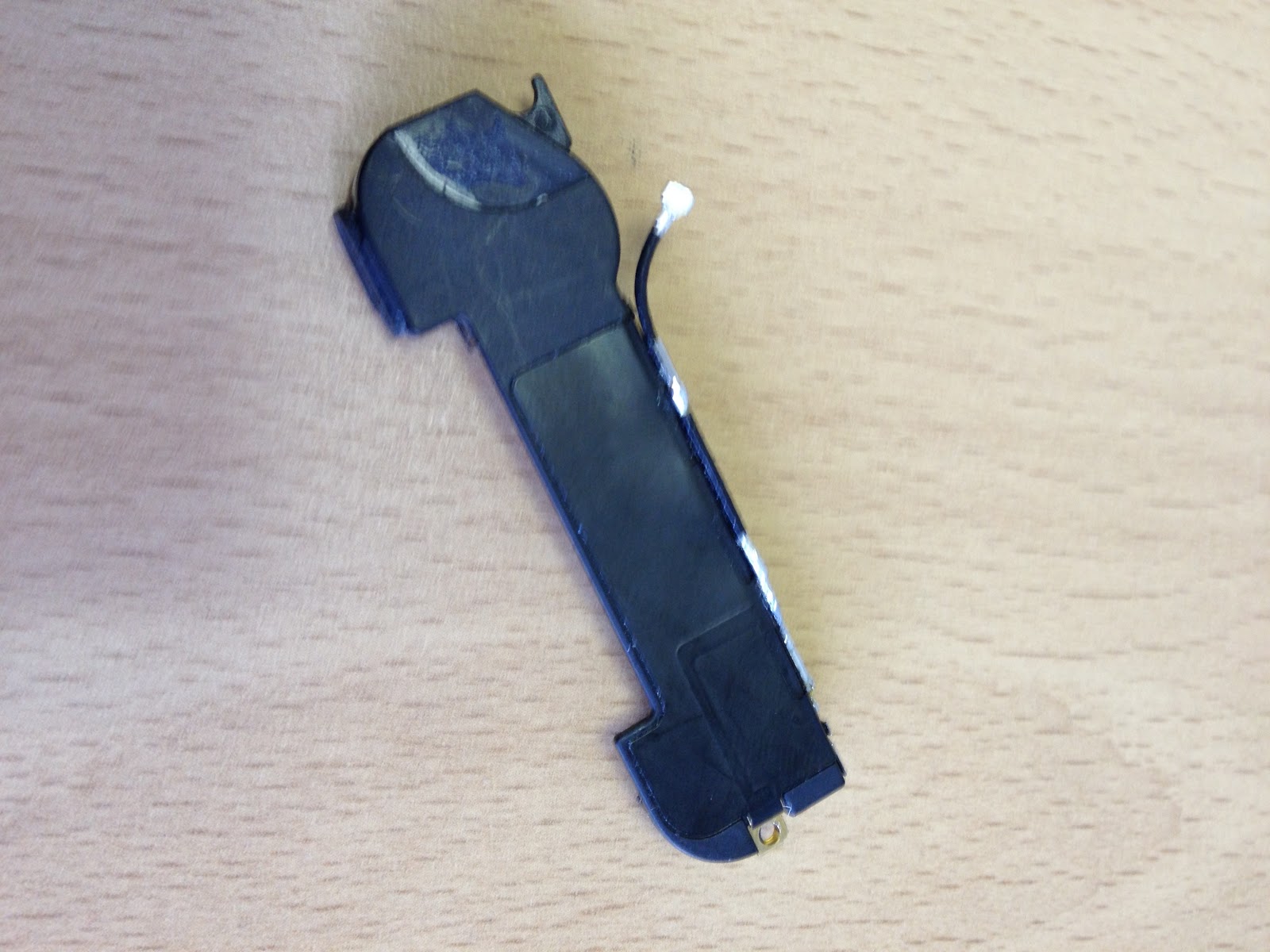
I also ended up having to replace the antenna/speaker component that you can see in the above picture, as the connector that you can see which connects to the motherboard got damaged on the original.


So, I nearly have a fully functional iPhone 4.  The final issue I have is that the mobile signal drops whenever I pick the iPhone up - which is obviously a bit of a nuisance.  But, my research informs me that this could be a loose connection, or the fact that some of the connections need cleaning with a de-greaser such as Windex.  As yet, I have not had the time to try this but it is on my to do list.

So what have I learned?  The most important thing is that I should have taken my time more, and been a bit more careful.  I was in truth a bit gung-ho, heavy handed, and in too much of a hurry.  I made several mistakes as a result but I now know that I can fix an iPhone that ends up in such an unfortunate condition.

I have in fact successfully replaced the screen on a white iPhone 4S for a colleague - and I'm pleased to say that this repair was a complete success.

And so ends this story.  I will post an update as to whether I get the SIM working properly, but in the meantime - I hope you have enjoyed reading about the ups and downs of this epic journey!

And that's that!
Peter

Oracle Virtualbox

I have often found myself wanting to try out new and different operating systems, yet frustratingly I have no spare hardware on which to experiment.  That's why I was really pleased to discover Oracle Virtualbox.

As described on their own website (https://www.virtualbox.org) - "Virtualbox is a powerful x86 and AMD64/Intel64 virtualization product for enterprise as well as home use. Not only is VirtualBox an extremely feature rich, high performance product for enterprise customers, it is also the only professional solution that is freely available as Open Source Software under the terms of the GNU General Public License (GPL) version 2".

It's easy to download and setup, and if like me you have a laptop with a 500gb hard drive - it gives you the chance to test multiple platforms on the same laptop, without the inconvenience of overwriting your existing OS, or setting up messy dual boot configurations.

Here's what Virtualbox looks like when you start it up;


As you can see, I have already used Virtualbox to install and test multiple platforms - including Windows 8 Consumer Preview, Ubuntu (more to come on that in another post), Mac OS X Snow Leopard, and even Android Ice Cream Sandwich.  I have also been able to find an ISO image of Windows 3.1 (purely for nostalgia purposes).


Configuring specific settings for each platform can be a bit tweaky, but there is lots of advice available if you do a bit of Googling - and so far I have managed to get everything working that I have put my mind to.


So if like me, you come from Planet Geek, and you want to try out different platforms to see what they can do - give Virtualbox a try.


And that's Virtualbox.  Share and Enjoy!
Peter


Wednesday, 16 May 2012

Screwed!

So my iPhone 4 replacement screen and digitizer had arrived and I took everything I needed home one Monday night, and once the boys were asleep and Louise was out to teach her Slimming World class - I got to work.  This is what the replacement screen and digitizer look like next to the gutted iPhone case;


Things started pretty well.  I listened to the football as I worked - Newcastle were away to Arsenal that night, and they scored early which was great, but Arsenal quickly equalized.


Bit by bit, I put the iPhone back together.  Getting some of the very small screws back into place was a lot harder than taking them out.  I made a few small mistakes along the way and had to backtrack - but eventually I got the phone back together and the moment of truth arrived, would the phone actually work?


I powered it on, and incredibly I see the Apple Logo and the phone begins to start up.  After a moment I see the familiar Home Screen and I feel utterly elated.  I can't believe that I have actually done this!!


However, I notice that there is a small gap between new screen and the case - so I figure I haven't screwed something in far enough.  I take off the back cover again, and I can see that one of the clips securing the motherboard doesn't seem to be quite secured enough. It is at this point that I make what can only be described as a "questionable decision".  I take my thumb and I push down on the connector.


I put the back cover back on, restart the phone - and this what I see;


My heart literally sinks.  What have I done?  I take the phone apart again, and it quickly becomes clear that I have one of the screws in the wrong place, and the action of pressing down on that clip with my thumb has pushed that screw through the new screen and absolutely ruined it!!


From a sense of utter elation, I now feel like I have been absolutely stabbed in the heart!  


Just when I think things can't possibly get any worse - Arsenal score a 95th minute winner!!


And that's how you ruin a new iPhone screen and digitizer!
Peter

Friday, 11 May 2012

Windows 8 is coming!

For the past few years - Microsoft haven't really done anything special.  Apple on the other hand have moved from the obscure into the mainstream.  iPhone and iPad are the 2 stand out Apple products for me.  These devices have propelled Apple to another level and Microsoft didn't seem to be responding.

To be fair, Apple are really focusing on the consumer - whereas business is really Microsofts bread and butter.  However, the tablet market has had a severe impact on consumer PC sales and Microsoft have to be increasingly aware of this.

So it's no surprise that a few months ago, Microsoft released Windows 8 Consumer preview (the beta version of their next Operating System).  I downloaded the preview and installed it on a PC and I must say that I have been on the whole very impressed.


In its current form, this OS is a bit of a hybrid.  They have designed it with tablets very much in mind - but it works equally well on a traditional PC with a keyboard and mouse.  Microsoft say that Windows 8 really comes to life on a tablet - but sadly, I currently have no suitable tablet hardware available to me to test this out, so for the time being I am stuck using it on a PC.

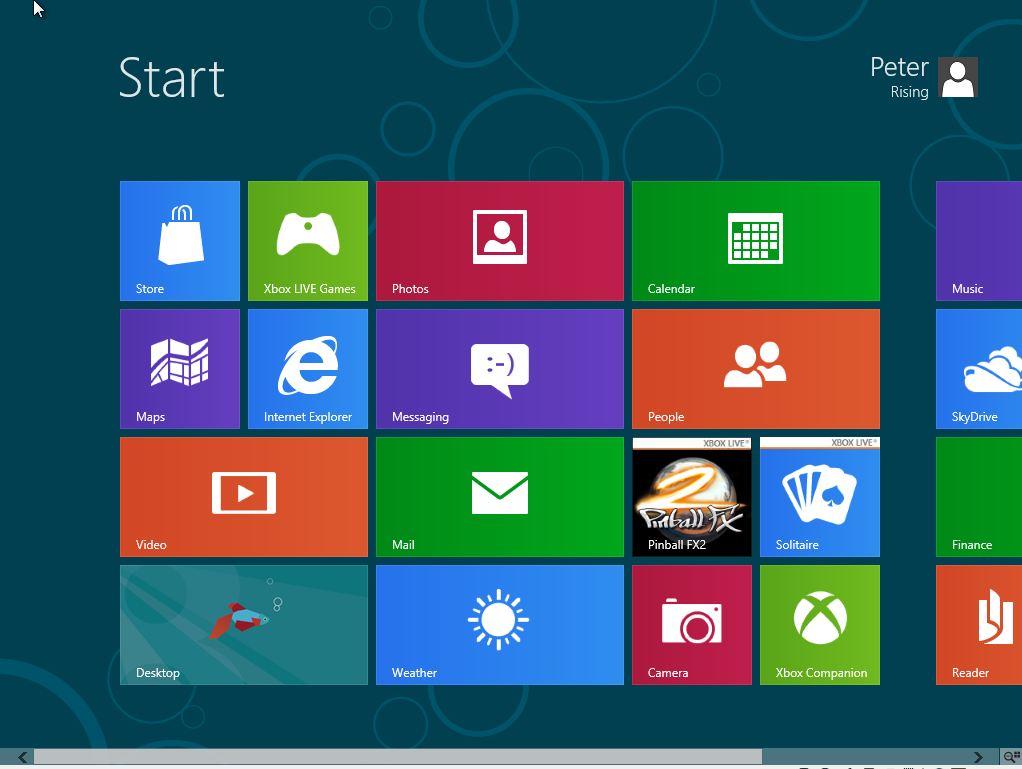
When you start up Windows 8, this is what you see;


The Start Screen contains tiles for what Microsoft are calling "Metro Style Apps".  You can immediately see that this is a touchscreen environment, and the style is pretty much identical to the Windows Phone OS that you will find on many HTC devices and the Nokia Lumia.  

So this is an early indication of Microsofts intention to standardize their entire range of products, in the same way that Apple has done with iOS.  Microsoft are clearly going to encourage you to have a Windows Phone, and a Windows 8 Tablet or PC/Laptop.  The benefits of this are that all your content will be highly available to you on all your devices and in a familiar way that is easy to access.


Apps

Windows 8 has some really nice native Apps such as the People Hub (which again is already available on Windows Phone).  In essense, this is an address book, but it's so much more than that.  It pulls together all of your contacts, and social feeds into one place giving you instant access to the information you need to keep you in touch.  

Then you have the Photos App.  Here you can quickly access all of the photos that you have on your device, or from your Facebook Account, your Skydrive, and from Flickr.  I like this one very much as it gives you quick and easy access to all of your pictures from all of your devices and social media in one convenient and easy to use Application, and I can only see it getting better in the final release of Windows 8.


In addition these native Apps, you can find many more that you can download from Microsofts new App Store.  Now this obviously has a long way to go until it catches up with Apples App Store and Android Marketplace - but it will get there.  There are already a few really good Apps available in here.  Popular games like Cut the Rope, News apps such as The Daily Telegraph, and when you download an app - it simply appears on your Start Screen as a Metro Tile.


Where is the Start Button though?

You will notice on the Start Screen that there is a tile called Desktop.  When you click this, it takes you into a more familiar Windows 7 style environment - and this will appeal greatly to those who like Windows 7 and aren't big on change.


However, one big change is the absence of the Start Button.  This has caused great waves already in the "tech community" and some developers have even found ways to "hack" the start button back onto the OS.  Whether it is present on the final release of Windows 8 remains to be seen - but for the time being, if you hover your mouse over where the Start button used to be, the Start Screen reappears and enables you to go back to the Metro Style Environment.

Charms

If you move you mouse the the right of the screen, the charms menu appears, giving you access to settings, devices and search features amongst other things.  In tablet format - the charms menu will be accessible via a touchscreen "gesture"


Whats Open

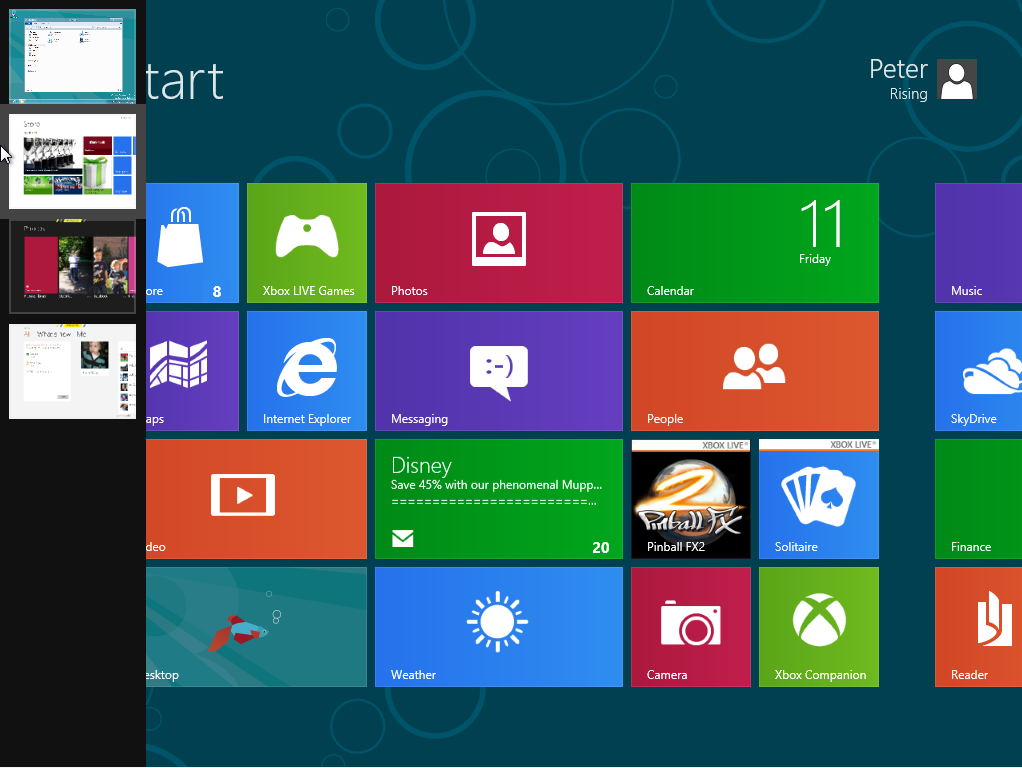
If you move your mouse to the top left of the screen, it shows you what apps you have running in the background and you can go back to them simply by selecting the one you need,


 Overall Thoughts

First impressions of Windows 8 are that it shows much promise.  I like the way it looks and feels like Windows Phone and I think this will help Microsoft to sell it's entire range of products.

I like the Start Screen and the Metro Style Apps.  I'd really like to see it on a tablet though, and it will be interesting to see what the final version is like once it's properly released.

As for that release date - well November this year has been rumoured, but for now, we'll just have to wait and see.  Whenever it is though - I predict Microsoft will be back with a bang!

And that's Windows 8!
Peter

Friday, 4 May 2012

The Next Galaxy - Samsung Galaxy S3 arrives

When it comes to smartphones, I'm an Apple Guy - I think most people know that by now.  Admittedly, things can change though.  A little over 2 years ago I was Blackberry through and through and considered Apple to be the Devil!  That just seems silly now, but it proves that you should never say never.


This brings me to the latest smartphone launch by Tech Giant Samsung just yesterday.  The Samsung Galaxy S3 comes hot on the heels of its hugely popular and successful predecessor, The Samsung Galaxy S2.


Available in marble and pebble blue, it has a 4.8-inch HD Super AMOLED screen which is substantially bigger than the S2's 4.3-inch display.  Further technical specs appear below - but first and foremost, lets see some pics of the phone (courtesy of the Samsung website).


This is a nice looking phone without a doubt.  The screen size is not for me - I think it's too big for a Smart Phone but that's just a personal preference.  The sales of the S3s predecessor don't lie.  Clearly, a lot of people want a smartphone this size.  Here it is in the marble;

The case is made of plastic, as compared to the iPhone 4S' glass case.  This apparently makes the S3 feel lighter than the iPhone, but many reviews of the S3 that I have read so far comment that this also makes the device feel a little cheaper.  Here it is in pebble blue;


Specs

  • 136.6 x 70.6 x 8.6mm
  • 133 grams
  • Display: 4.8-inch HD Super AMOLED (1280×720) Pentile (no Plus)
  • Processor: Exynos 4 Quad @ 1.4Ghz for HSPA version
  • 1GB of RAM
  • Rear Camera: 8MP Autofocus, Flash, Zero Lag Shutter BSI Image sensor
  • Front Camera: 1.9 MP HD, Flash, Zero Lag Shutter
  • Video: Full HD 1080p Recording and Playback
  • Storage: 16GB/32GB/64GB
  • 2,100mAh battery
  • GPS with GLONASS
  • 802.11n Wi-Fi, NFC, Bluetooth 4
  • microSD expansion
  • 21Mbps HSPA, LTE supported
  • Micro SIM
  • OS - Android Ice Cream Sandwich

Thoughts

It's going to take something pretty special to eventually surgically detach me from my iPhone, and for me - this is not it.  Although I quite like the look of the handset, I just don't like Android - and that is my biggest problem.  Androids interfaces feel a bit dull to me and don't compare to the beauty and simplicity of iOS.  

If I were to move away from iOS devices right now - then it would unquestionably be to the impressive and and ever improving Windows Phone platform, and probably to the beautiful Nokia Lumia 800 or 900 series.  More on the Nokia and Windows Phone to come in another post, but in the meantime - in the seemingly never ending battle between Samsung/Google & Apple, it will be interesting to see how Apple respond to this. 

I have a feeling we will find out this October when I am predicting the arrival of "The New iPhone", but we will just have to wait and see.  If you want to get your hands on the Samsung Galaxy S3 though, you won't have as long to wait, as it will be released in the UK at the end of May.

In Depth Reviews

Check out far more eloquent, and possibly unbiased views on the new Samsung Galaxy S3 at the excellent T3.com and Techradar.com


Hope you've found this entertaining and informative.  
Peter